Build a realtime leaderboard
Add a live top ten to a game you already have: a backend that keeps every user's best score under their signed identity, and a list that updates on every phone the moment someone sets a new best.
What you'll build
We start from Breakout: bricks, a paddle, a score and a game-over screen. Any game with a score and an end works the same way. You add three pieces and leave the game itself alone:
- A backend with a
scoretable: one row per user, holding their best score. - A
submitfunction on the backend that saves a score under the user's signed identity, so nobody can post as someone else. - A top ten on the game-over screen that updates live, on every phone, as new bests arrive.
You need the CLI, an API key and a tik with your game in it; see the Quickstart or Bring your game. A backend needs the Pro plan. Every snippet here is cut from a working tik, so it runs as written.
1. Turn on the backend
$ codetik backend$ codetik permissions --auth oncodetik backend adds what a backend needs: the switch in tik.yaml, a starter module in backend/src/index.ts and the spacetimedb library in package.json. It publishes the starter and writes the bindings your page imports into src/module_bindings/.
--auth on makes users identified rather than anonymous: each keeps the same identity across sessions, with a signed name and avatar. That is what lets a best score belong to someone. See Backend for the two shapes.
2. Write the module
Replace the starter in backend/src/index.ts:
// The leaderboard's database: one row per user with their best score, written only// through `submit`, which takes the user from the signed token and checks the score. import { schema, table, t, SenderError } from 'spacetimedb/server';import { requireCaller, callerClaims } from './tik-backend'; const scoreTable = table( { name: 'score', public: true }, { identity: t.identity().primaryKey(), name: t.string(), avatarUrl: t.string(), best: t.u32(), updatedAt: t.timestamp(), },); const spacetimedb = schema({ score: scoreTable });export default spacetimedb; // Every brick cleared: 7 columns of 6 + 5 + 4 + 3 + 2 + 1 points.const MAX_SCORE = 147; export const submit = spacetimedb.reducer( { score: t.u32() }, (ctx, { score }) => { requireCaller(ctx); const who = callerClaims(ctx); if (who === null) throw new SenderError('sign in to post a score'); if (score > MAX_SCORE) throw new SenderError('implausible score'); const row = { identity: ctx.sender, name: who.name ?? 'user', avatarUrl: who.avatarUrl ?? '', best: score, updatedAt: ctx.timestamp, }; const existing = ctx.db.score.identity.find(ctx.sender); if (existing === null) ctx.db.score.insert(row); else if (score > existing.best) ctx.db.score.identity.update(row); },);- The table is public, so every user can read the leaderboard. The primary key is the user's identity, so each user has one row.
ctx.senderdecides whose score it is. It comes from the signed token and cannot be faked; the score is the only argument. A reducer that took a user id would let anyone post as anyone.requireCallercomes first, in every reducer. Withauthon it refuses anonymous callers.- The name and avatar come from
callerClaims, the signed token, not from the page. - The score is checked on the server. Anyone can call
submitwith any number, so refuse what the game cannot produce: in this Breakout, clearing every brick is 147 points.
Publish it:
$ codetik backendReplacing the starter wipes its sample rows; before the first release your data is test data. codetik dev also republishes the module on every save under backend/src.
3. Connect from the page
Put the leaderboard in a file of its own, so the game only calls three functions:
import { DbConnection, tables } from './module_bindings'; let connection: DbConnection | null = null;// Every connect and disconnect bumps it: a connect overtaken while it waited stops.let attempt = 0;let myHex = '';let list: HTMLOListElement | null = null; /** Connect to the tik's database and keep `target` showing the top ten. */export async function connect(target: HTMLOListElement): Promise<void> { list = target; if (!tik.spacetimedb || connection) return; const mine = ++attempt; const { url, database } = await tik.spacetimedb(); const token = tik.token ? await tik.token().catch(() => undefined) : undefined; if (mine !== attempt) return; let builder = DbConnection.builder().withUri(url).withDatabaseName(database); if (token) builder = builder.withToken(token); connection = builder .onConnect((conn, identity) => { myHex = identity.toHexString(); conn.subscriptionBuilder().onApplied(render).subscribe([tables.score]); }) .build(); connection.db.score.onInsert(render); connection.db.score.onUpdate(render);} export function disconnect(): void { attempt += 1; connection?.disconnect(); connection = null;} /** Save a finished game's score; the backend keeps the best one. */export async function submitScore(score: number): Promise<string | null> { if (!connection) return 'offline'; try { await connection.reducers.submit({ score }); return null; } catch (error) { return error instanceof Error ? error.message : String(error); }}tik.spacetimedb()says where the database is; never hardcode it.tik.token()identifies the user; call it for each connection and never store it.attemptcovers a swipe away whileconnectis still waiting:disconnectbumps it, and the overtakenconnectstops instead of opening a connection off screen.- The first rows arrive in
onApplied;onInsertandonUpdatekeep the list live after that, whoever set the score. - A reducer call rejects with the module's
SenderErrormessage, sosubmitScorereturns it for the game to show.
4. Show the top ten
Add the rendering to the same file:
function render(): void { if (!connection || !list) return; const top = [...connection.db.score.iter()] .sort((a, b) => b.best - a.best) .slice(0, 10); list.replaceChildren( ...top.map((row) => { const item = document.createElement('li'); const name = document.createElement('span'); const best = document.createElement('span'); name.textContent = row.name; best.textContent = String(row.best); item.append(name, best); item.classList.toggle('me', row.identity.toHexString() === myHex); return item; }), );}iter()is an iterator: spread it before sorting.- An identity is an object: compare
toHexString(), never===. - User names go in with
textContent, neverinnerHTML.
And give the list a place on the game-over screen, in index.html:
<div id="overlay"> <h1>BREAKOUT</h1> <div class="sub" id="overlay-sub">drag to move · clear every brick</div> <ol id="leaderboard" aria-label="top ten"></ol> <div id="board-note"></div> <div class="cta" id="overlay-cta">tap to start</div></div>5. Hook it into the game
Import the three functions and find the list:
import { connect, disconnect, submitScore } from './leaderboard';const board = document.getElementById('leaderboard') as HTMLOListElement;const boardNote = document.getElementById('board-note')!;Send the score when a run ends. One helper does it and shows a note when the save fails:
// Sends a finished run to the shared top ten; the overlay says when it was not saved.function postScore(final: number): void { boardNote.textContent = ''; void submitScore(final).then((problem) => { if (problem) boardNote.textContent = `Not saved: ${problem}`; });}Breakout ends a run in two places, clearing the wall and losing the last life, and each calls it:
function winGame(): void { phase = 'won'; postScore(score);if (lives <= 0) { phase = 'dead'; postScore(score);Last, connect while the tik is on screen and let go when it leaves. The feed keeps a tik loaded off screen, and an open connection would keep receiving every score; the game's loops stop with it:
// The feed loads a tik before it is on screen: the game and the connection run only while it is visible.// Pixi runs two loops, the app's and the input system's Ticker.system, so both stop.function show(): void { app.ticker.start(); Ticker.system.start(); void connect(board);} function hide(): void { app.ticker.stop(); Ticker.system.stop(); disconnect();} if (tik.visible()) show();else hide();tik.on('visible', show);tik.on('hidden', hide);PixiJS runs two loops, the app's ticker and the one its input system uses, so both stop. Hidden, the tik draws no frames at all.
6. Try it
$ codetik devThe preview signs you in as your own account, so your first game posts the first row. Publish a draft and open it from Drafts in the Codetik app on your phone: set a new best there, and the list in the preview updates at the same moment.
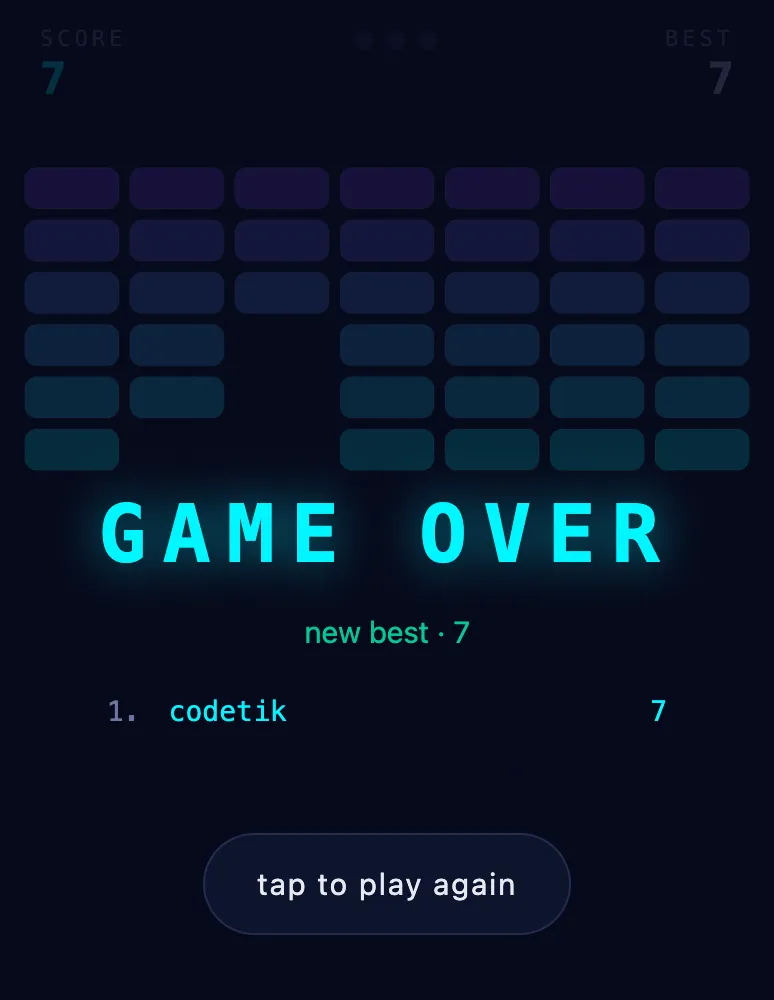
7. Publish
$ codetik publish --liveThe first release clears the test rows, so users start with an empty leaderboard. After that the scores belong to the users: a breaking change to the score table is refused. Add new columns with .default(...) rather than reshaping old ones.
Recap
codetik backendand--auth ongive the tik a database whose users have a stable, signed identity.- A reducer is the only way data changes;
ctx.senderdecides whose row it is, and the server checks the score. - The page subscribes once and re-renders on every insert and update, on every phone.
- Connect while visible, disconnect when hidden.